MX5info
  • Do It Yourself
    • Air conditioning on the NB2 Miata
    • Making Audio Buttons from Mazda Protege Cruise Control Buttons
    • Mazda 6 cruise control for the NA or NB Miata
    • Programming Keys and Remote Controls
    • Tired of droopy eyeballs?
  • Modifications
    • Audio
      • Audio controls on the NB steering wheel
      • Connecting the Wiring for the Rear Speakers in the MX-5 NB/NBFL
      • Speaker Upgrade in the NB2 Wind Deflector
      • Streaming audio and making calls using the stock radio
    • Convenience
      • A dual auto-down function
      • Audio controls on the NB steering wheel
      • Automatically dimming mirror
      • Displaying the ambient temperature on the NB1 clock
    • Lighting
      • LED rings in the taillights—how do you do that?
      • Side marker lights from a previous generation
      • Symmetrical taillights for the NBFL in 2 ways
    • Special
      • A dual auto-down function
      • Air conditioning on the NB2 Miata
      • Automatically dimming mirror
      • Displaying the ambient temperature on the NB1 clock
      • Is the low-fuel light still working?
      • Making Audio Buttons from Mazda Protege Cruise Control Buttons
      • Tired of droopy eyeballs?
  • Cruise Control
    • Cruise Control overview
    • Cruise Control NA Miata
    • Cruise Control NA MX-5
    • Cruise Control NB/NBFL MX-5
    • Cruise Control NC MX-5
    • Cruise Control Mazda 2
    • Cruise Control RX-8
    • Mazda 6 cruise control for the NA or NB Miata
  • MX-5 Fun Facts
    • Special Editions
      • 2002 Memories II
      • 2003 Silver Blues, Twins, Nevada, Classic Edition
      • 2004 Memories III
      • 2004 Murphy & Nye
      • 2005 Impuls
    • Differences Between the NB1 and NB2 Miata and MX-5
    • Why does the battery keep running out?
  • My MX-5s
    • My MX-5 overview
    • My first MX-5
    • Project Lübeck
    • Project Oberhausen
    • Project Schömberg
    • Project Silver Blues
  • About MX5info
    • About me
    • MX5info on YouTube
  • Contact
  • Nederlands

Cruise Control NB/NBFL MX-5

by Jeroen van Dinther

My own NBFL was the first MX-5 on which I installed cruise control. I chose to install an original cruise control system, like the one Mazda did offer on the North American market but not in Europe.

Before I made that decision, I posted a message in the MX-5 Facebook group because I wanted to know how others had added cruise control to their MX-5s. The responses indicated that most people used an aftermarket system, such as the one by John Gold. When I looked into it further, it quickly became clear that it wasn’t just expensive, but also, in my opinion, unattractive.

With the system that Mazda itself installed at the factory, the speed can be set using a lever located next to the windshield wiper control, which also provided cruise control functionality.

Further research into that system led to the conclusions that the parts are unavailable in Europe, and that the necessary wiring is completely absent from the European MX-5. A logical next step was to design the necessary wiring and order used parts from the United States.

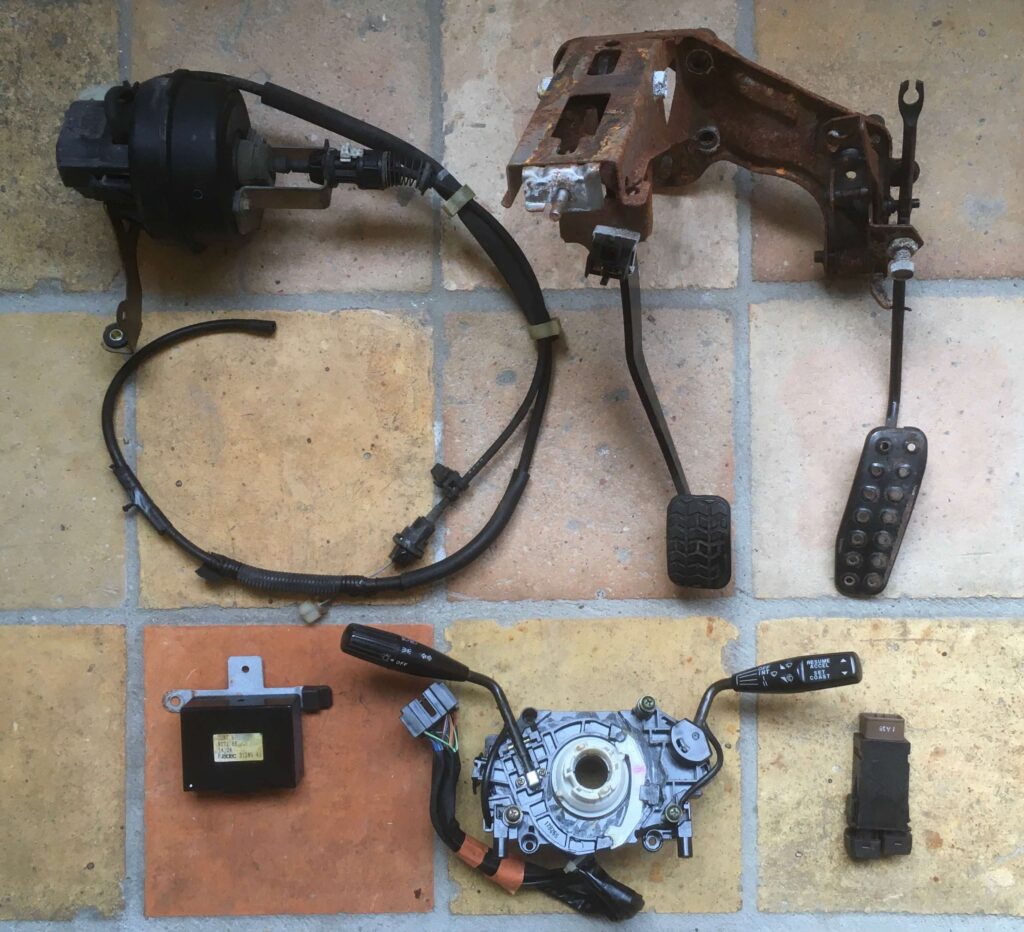
A complete set of parts for cruise control on the NB or NBFL looks roughly like the photo below and includes the following components:

  • a main switch that turns the system on or off;
  • the cruise control module, the system’s electronic brain;
  • the actuator, a vacuum-operated actuator that controls the accelerator pedal via a cable;
  • an accelerator pedal with a lever mechanism, to which the actuator’s cable is attached;
  • a replacement lever on the steering wheel, used to adjust the set speed;
  • a replacement brake switch, which can pause the system after braking.
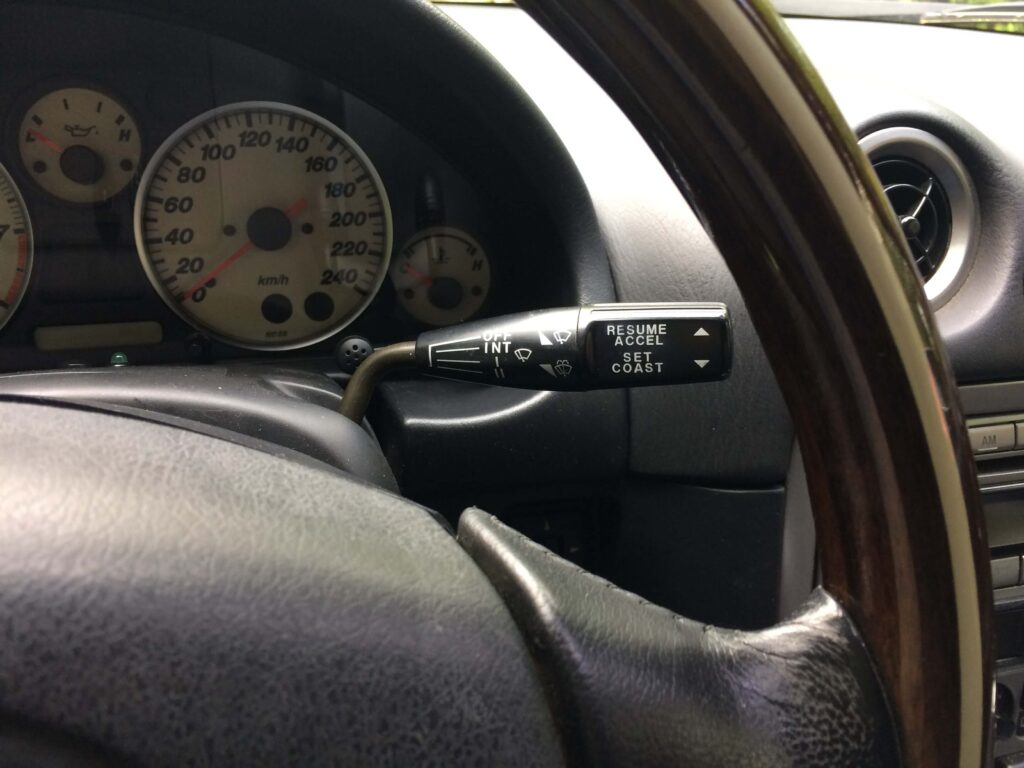
The lever behind the steering wheel is part of the combination switch. I always try to buy one where the printing—the symbols and letters—hasn’t faded yet. If you’re lucky, both levers are still in good condition, and you can replace the entire combination switch. If the left lever is in poor condition, you might consider transferring the new right lever to your current combination switch. In either case, the current combination switch must be removed from the car. To do this, the airbag, the steering wheel, and the clock spring must be temporarily removed from the steering column.

After installing the lever, this is what it looked like in my car.
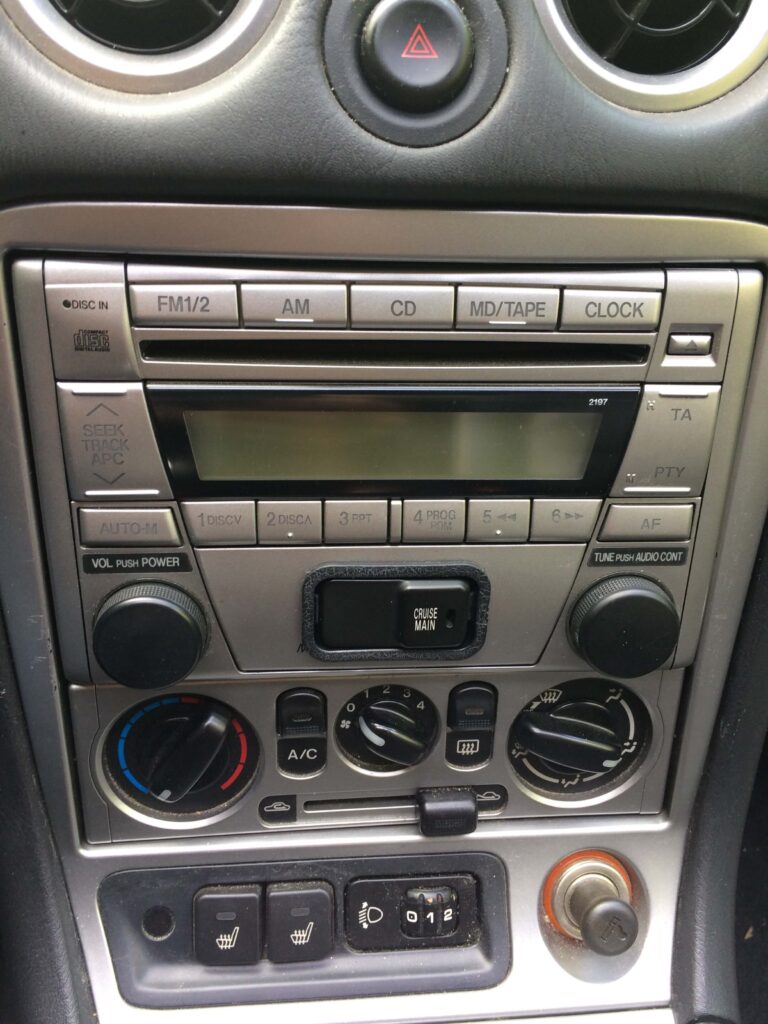
There are two versions of the main switch available. One is for the NB, with a green light, specifically for cruise control, and an NBFL version, with a red light, in which the cruise control main switch is combined with the front fog light switch. In my car, all the switch locations were already taken. That’s why, at the time, I came up with a solution to install the NB main switch in the lower part of the stock radio.
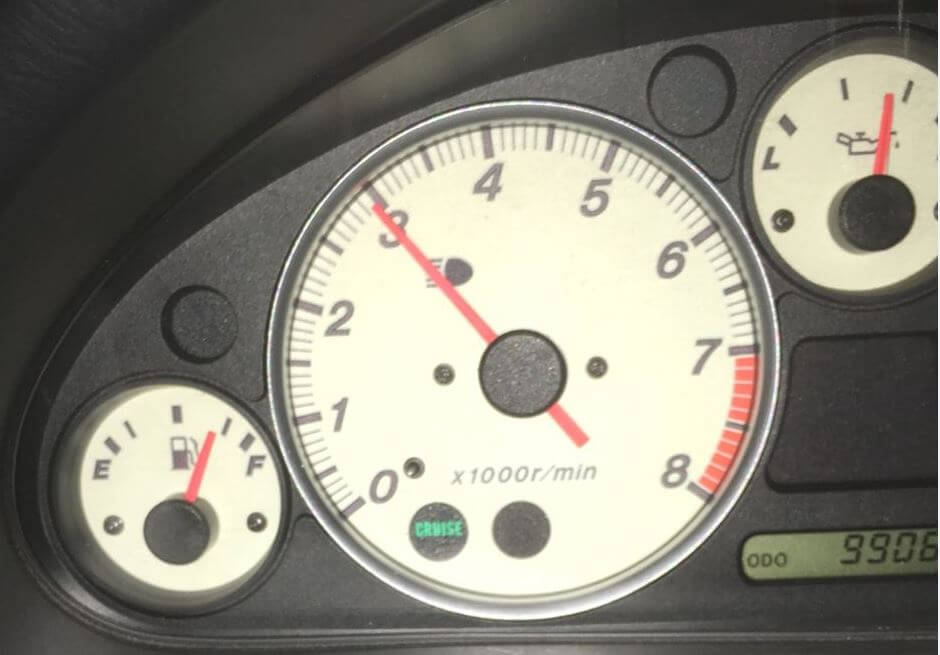
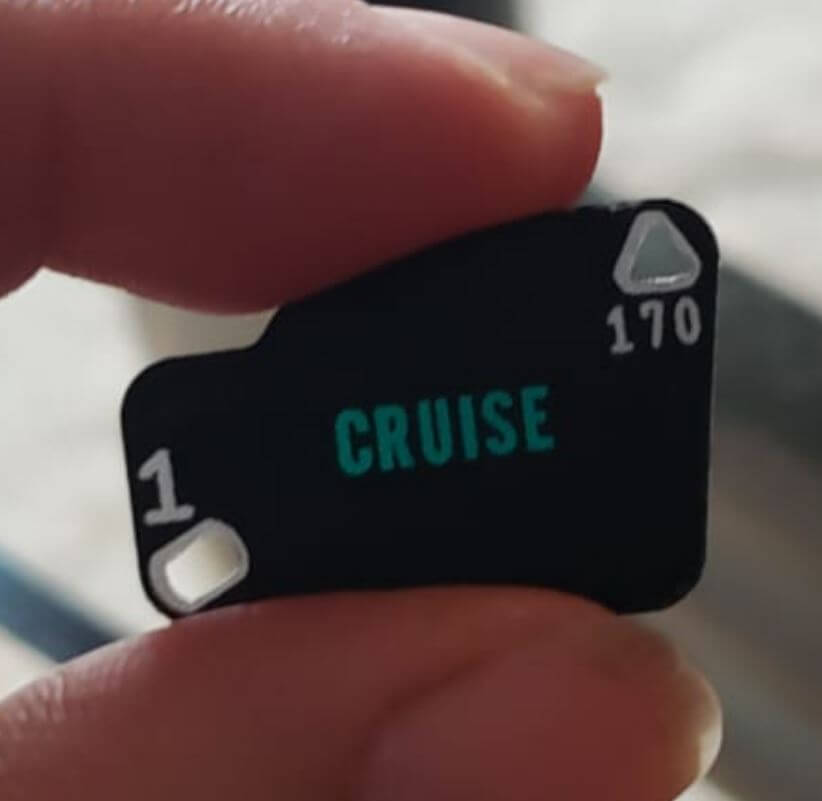
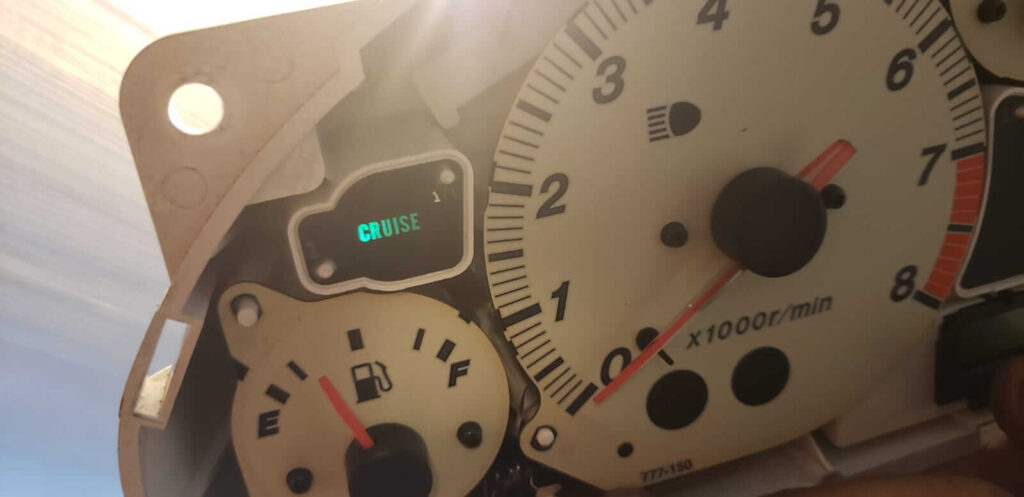
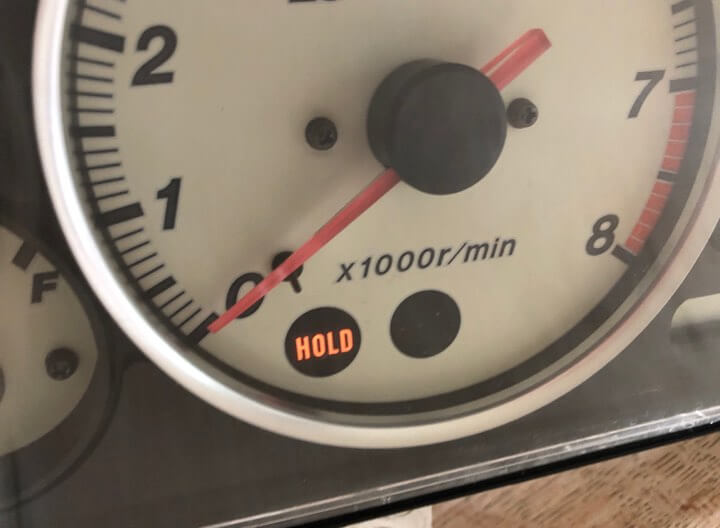
In the North American NB and NBFL models, there was a cruise control indicator in the instrument cluster; in Europe, this was not the case. In my cluster, one position was not actively in use because it was intended for cars with an automatic transmission. That position is located on the tachometer dial, and the lens has the text “HOLD.” I used it for a while and interpreted it as “HOLD SPEED.” Knowing that lenses with the text “CRUISE” were indeed used prompted me to go on the hunt for one. Eventually, I found a solution: a lens from the instrument cluster of a North American NB or early NBFL, where the lens was located above the fuel gauge.
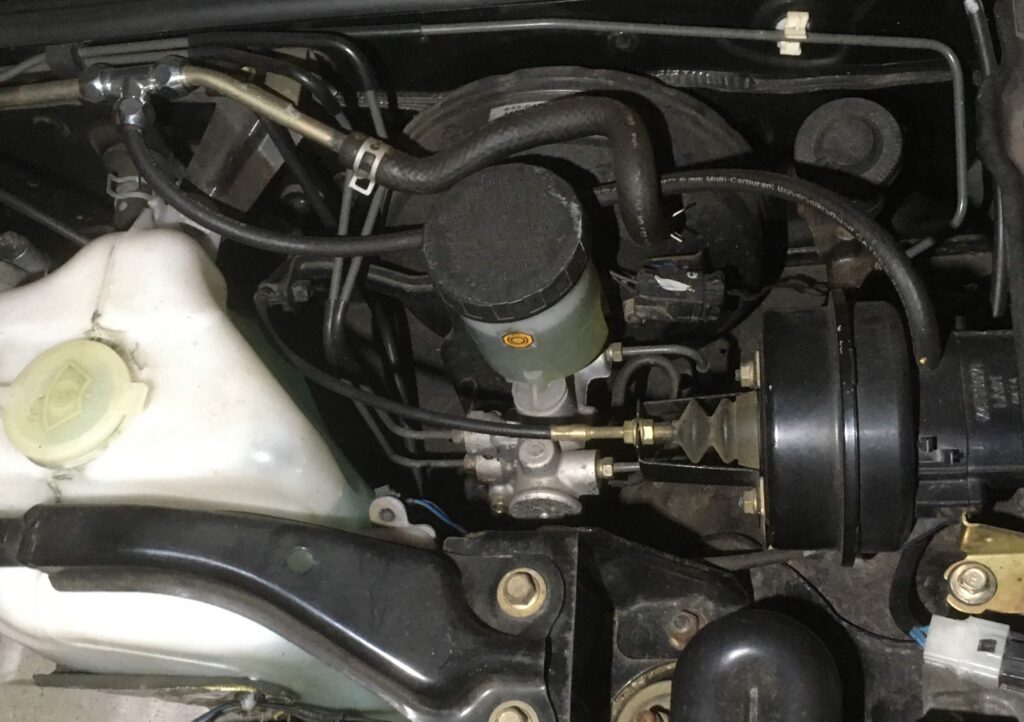
I also noticed that there was no vacuum connection on the actuator motor. In the end, I decided to create that connection in the hose that supplies vacuum to the brake booster. That hose is a standard part of every NA, NB, and NBFL, so it’s easy to find if you ever want to go back to the original setup.
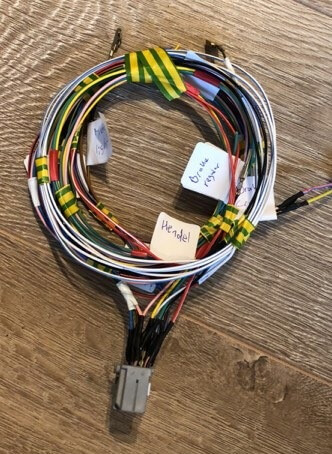
Finding the right connectors and building the extension onto the wiring harness was quite a task. Running the wiring through the car also takes some time and precision. In addition to connecting the various components via their connectors, some parts also need to be soldered onto the existing wiring. In the end, it was worth the effort—and you’ll quickly forget about it once the system is up and running.
If the system isn’t working properly after installation, or if you want to check whether all signals are being received correctly by the module, you can use the system’s diagnostic features. The video below shows you how to do that.
If you have any questions, you can reach me via the contact page

If this information has been helpful to you and you’d like to support my work for the MX-5 community, please consider subscribing to the YouTube channel. It costs just a small amount each month. It helps me continue to invest in developing new knowledge and experience that I can then share with you.
You can find more information about this here

Share FacebookWhatsappEmail

Recent comments

    Recent posts

    • Displaying the ambient temperature on the NB1 clock

    • Making Audio Buttons from Mazda Protege Cruise Control Buttons

    • MX5info on YouTube

    • Tired of droopy eyeballs?

    Categories

    • Audio (5)
    • Convenience (7)
    • Lighting (3)
    • News (1)
    • Special (7)

    @2021 - All rights reserved. Developed and designed by TwoImprove. Cookie Policy / Privacy policy

    This website uses cookies to improve your experience. We assume you're okay with this, but you can change your settings if you'd like. Cookie settingsAccept
    Manage consent

    Privacy Overview

    This website uses cookies to improve your experience while you navigate through the website. Out of these, the cookies that are categorized as necessary are stored on your browser as they are essential for the working of basic functionalities of the website. We also use third-party cookies that help us analyze and understand how you use this website. These cookies will be stored in your browser only with your consent. You also have the option to opt-out of these cookies. But opting out of some of these cookies may affect your browsing experience.
    SAVE & ACCEPT

    MX5info
    • Do It Yourself
      • Air conditioning on the NB2 Miata
      • Making Audio Buttons from Mazda Protege Cruise Control Buttons
      • Mazda 6 cruise control for the NA or NB Miata
      • Programming Keys and Remote Controls
      • Tired of droopy eyeballs?
    • Modifications
      • Audio
        • Audio controls on the NB steering wheel
        • Connecting the Wiring for the Rear Speakers in the MX-5 NB/NBFL
        • Speaker Upgrade in the NB2 Wind Deflector
        • Streaming audio and making calls using the stock radio
      • Convenience
        • A dual auto-down function
        • Audio controls on the NB steering wheel
        • Automatically dimming mirror
        • Displaying the ambient temperature on the NB1 clock
      • Lighting
        • LED rings in the taillights—how do you do that?
        • Side marker lights from a previous generation
        • Symmetrical taillights for the NBFL in 2 ways
      • Special
        • A dual auto-down function
        • Air conditioning on the NB2 Miata
        • Automatically dimming mirror
        • Displaying the ambient temperature on the NB1 clock
        • Is the low-fuel light still working?
        • Making Audio Buttons from Mazda Protege Cruise Control Buttons
        • Tired of droopy eyeballs?
    • Cruise Control
      • Cruise Control overview
      • Cruise Control NA Miata
      • Cruise Control NA MX-5
      • Cruise Control NB/NBFL MX-5
      • Cruise Control NC MX-5
      • Cruise Control Mazda 2
      • Cruise Control RX-8
      • Mazda 6 cruise control for the NA or NB Miata
    • MX-5 Fun Facts
      • Special Editions
        • 2002 Memories II
        • 2003 Silver Blues, Twins, Nevada, Classic Edition
        • 2004 Memories III
        • 2004 Murphy & Nye
        • 2005 Impuls
      • Differences Between the NB1 and NB2 Miata and MX-5
      • Why does the battery keep running out?
    • My MX-5s
      • My MX-5 overview
      • My first MX-5
      • Project Lübeck
      • Project Oberhausen
      • Project Schömberg
      • Project Silver Blues
    • About MX5info
      • About me
      • MX5info on YouTube
    • Contact
    • Nederlands